 Loopstack
How to chop samples on iPhone
Chopping means cutting a recording into short pieces and playing them back in a new order. It's how a lot of beats are built. You can do the whole thing on an iPhone or iPad.
This guide uses Loopstack's sampler. The same steps apply to most sampler apps: get a sound in, slice it, play the slices, keep the result.
Use sounds you're allowed to use. Record your own sounds, use royalty-free sample packs, or resample loops you've made. Chopping someone else's record into a song you release needs their permission.
1. Get a sound in
In Sound & pads, switch to Sampler. You have three ways to fill it:
- Record it: tap Capture sample, play or sing into the microphone, then tap Stop capture. Tapping on a table, a kettle, or a voice saying one word all make good material.
- Import a file: open the Import menu and choose Import file… to load audio from Files.
- Resample yourself: in the same menu, choose Everything playing or A loop to capture one cycle of what you've already made. Resampling your own loops and chopping them up is a great way to get new ideas from old ones.
If the sample is quiet, tap Normalize to bring it up to full level.
2. Chop it
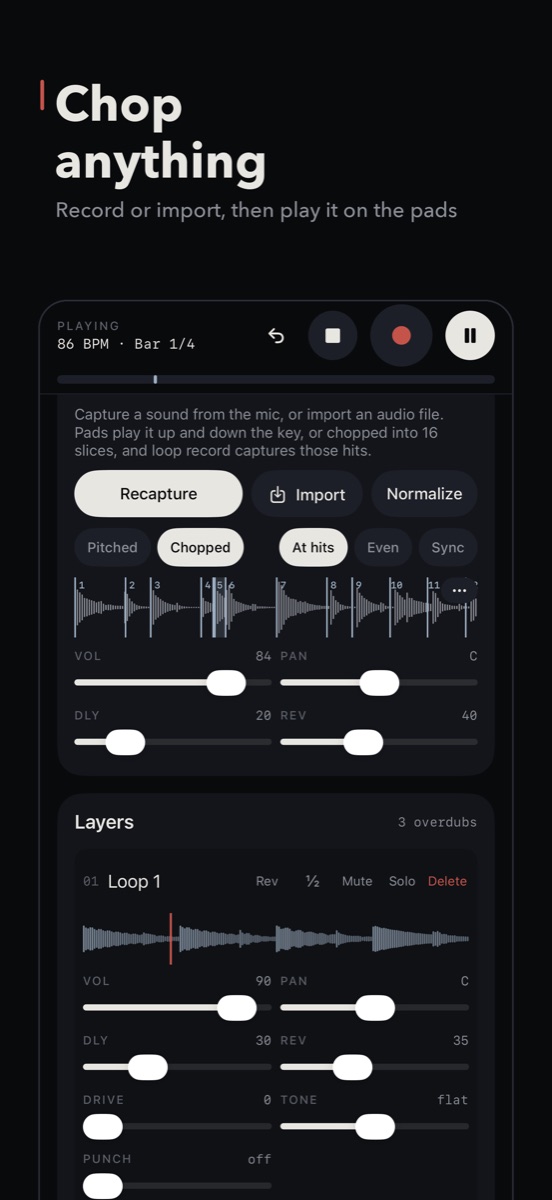
Choose Chopped instead of Pitched. The sample is split into up to 16 slices, one per pad. Pick how:
- At hits finds the attacks: every drum hit, note or syllable gets its own slice. Best for drum breaks and phrases.
- Even cuts the sample into equal pieces. Best for pads, textures and long sounds.
- Sync stretches the sample to the project's tempo. Hold it to pick how many bars the sample should fill.
3. Fix the cuts
The automatic cuts are rarely perfect. On the waveform:
- Drag a chop line to move it, so the slice starts right on the hit.
- Double-tap to add a cut where the app missed one.
- Pinch to zoom in for fine moves.
4. Shape each chop
Hold a pad for half a second to open its chop editor. Each chop has its own Level and Pitch, plus:
- Reverse, which plays it backwards. Reversed cymbals and vocals make great transitions.
- Cut by next, which stops this chop when the next one starts. Turn it on for tight, choppy patterns.
- One-shot or Hold. A one-shot plays the whole slice with a tap; Hold plays only while your finger is down.
- Use on drum, which puts the chop in your drum kit. A chopped snare from your own recording can replace the kit snare.
5. Play it and record a loop
Now the pads play your chops. Find a pattern you like, then press Record. Loopstack records one full pass of your hits as a loop, in time. Add drums, a bassline and more loops on top.
Every loop has a Morph section too. Try Repeat at 1/16 for stutters, or Speed ½× for a slowed-down version of your chopped loop.
6. Keep it
Open the chop options (the … menu) and choose Save as kit. That stores the sample with all its chops and settings, ready to load in any project from Your sounds. You can also save a single chop as a sound of its own.
Quick recap
- Sampler → Capture sample, Import file or resample a loop.
- Chopped → At hits for beats, Even for textures.
- Drag, double-tap and pinch to fix the cuts.
- Hold a pad to reverse, pitch or cut each chop.
- Record a loop of your hits, then Save as kit.
Loopstack is a beat and loop maker for iPhone and iPad. Pay once, no subscription. See what's inside or read another guide.