 Loopstack
How to make a beat on your iPhone
You don't need a laptop, a controller or music lessons to make a beat. Here's how to go from nothing to a finished beat on an iPhone or iPad in about ten minutes, using Loopstack.
The ideas here work in any beat maker: start from a groove that already feels good, change a few hits until it's yours, then build the rest of the track on top. The button names below are Loopstack's.
1. Set the tempo and the feel
Open Loopstack and find the transport near the top of the page.
- Tempo: drag the BPM slider, or tap Tap in time with a song you like. Slow, hazy beats tend to sit around 70 to 90 BPM, boom bap around 85 to 95, house near 120 to 125, and fast breaks well above 160.
- Time signature: 4/4 covers almost everything. 3/4, 5/4 and 6/8 are there for waltzes, odd meters and swung, rolling grooves.
- Length: 2 or 4 bars is a good start for a beat. You can't change the length or meter after the first loop is recorded, so pick them now. Tempo can still change later; loops stretch to fit without changing pitch.
2. Turn on the drums and pick a kit
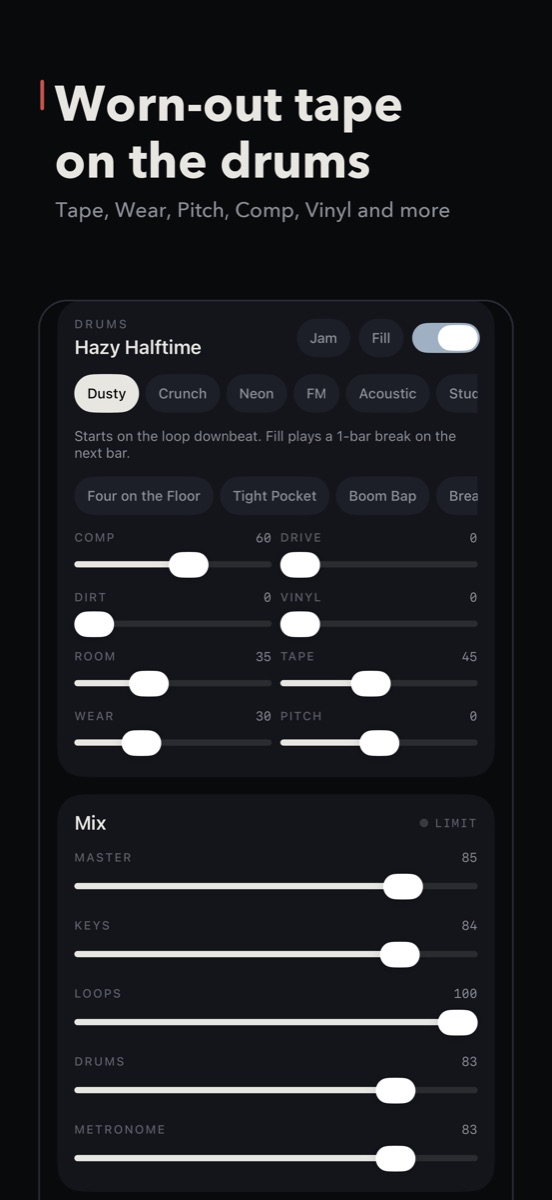
Scroll to the Drums card and flip the switch at its top right. Then choose a kit. Each has a different character:
- Dusty and Crunch for lo-fi and sampled-sounding beats
- Neon and FM for electronic and synth-heavy tracks
- Acoustic, Studio, Rock, Jazz, Brushes and Hand for played-drum feels
Then pick a groove from the row below the kits. The groove list changes with the time signature, so a 6/8 project shows grooves written for 6/8.
3. Make the pattern your own
A preset groove is a starting point. Tap Steps to edit it:
- Choose a drum: Kick, Snare, Hat, Open Hat, Clap, Rim, Tom or Perc.
- Tap a step to add or remove a hit.
- Hold a step for more: make it Loud or Soft, set how often it plays (always, 75%, 50% or 25% of the time), or turn it into a roll (×2, ×3 or ×4).
- Use Swing to push the off-beats late. A little swing makes a stiff pattern feel played.
Two tricks that make a beat sound human: make some hi-hats soft so they don't all hit at the same level, and set an occasional ghost snare to play 25% of the time so the loop never repeats exactly.
Want a sound the kit doesn't have? Open a drum's sound menu and choose Import from Files… or The sampler's sound.
4. Give the drums some character
The drum sliders shape the whole kit at once. Comp and Drive add punch, Dirt and Vinyl add grit and crackle, Room puts the kit in a space, and Tape and Wear make it sound like an old recording. Go easy: two or three moves usually beat all eight.
In 4/4 you'll also see Jam and Fill. Jam varies the groove every bar and drops in fills on its own, which is great for jamming over. Fill plays a one-bar break on the next bar.
5. Add a bassline
A beat comes alive once there's a bassline. In Sound & pads:
- Set the Key (say, A Minor). Every pad is now in key, so you can't hit a wrong note.
- Pick a sound from the Bass row.
- Press Record. With Count-in on, you get one bar to get ready. Loopstack records exactly one pass of the loop and closes it where it started, so the loop is always in time.
Not happy with it? Hold the loop's name and choose Record a new take. The old take is kept, so you can switch back.
Next, add chords or a melody the same way. Turn on Chord to play full chords from one finger, or Arp to turn held notes into a pattern locked to the beat. You can stack up to eight loops.
6. Make it a song, then export
When the stack sounds good, tap Send to song. That adds one pass of everything as a block in Song. Change something (mute the drums, add a loop, turn on a Fill), send again, and you have a second section. In Song, set how many times each block repeats and put them in order.
Then tap Export song and pick WAV for full quality or M4A to share. To keep working in a desktop DAW, Share stems gives you a WAV per loop, the drums, and a MIDI file for every keys loop.
Quick recap
- Set tempo, meter and length.
- Turn on Drums, pick a kit and a groove.
- Edit steps: soft hats, a chancey ghost note, a little swing.
- Record a bassline in key.
- Send to song, arrange, export.
Loopstack is a beat and loop maker for iPhone and iPad. Pay once, no subscription. See what's inside or read another guide.